
User Authorization Levels
V202604
Overview of the Role Hierarchy
Each user in Global Product Access is assigned a role that determines which features they can access and what actions they can perform. Roles are hierarchical — higher-level roles have broader access and can manage users at lower levels within their scope.
The four roles, from broadest to most limited scope, are:
- Host — Internal ECGrid administrators only. Full system-wide access across all networks.
- Network Admin — Manages a network of company accounts. Sets branding and adds Company Admins.
- Company Admin — Full administrator for a single company account. The primary role for publishers.
- Company User — Standard day-to-day user within a company account. Limited configuration access.
Note Most publisher accounts operate at the Company Admin or Company User level. Network Admin and Host roles are not assigned to external publisher or subscriber accounts. |
Role Definitions
The following section describes the capabilities and access scope for each role in detail.
Host (Internal — TechOps ECGrid Admin)
Scope: Full system-wide access across all networks | Internal use only (ECGrid TechOps)
User Management
- Create and manage Network Admins, including creating new networks
- View, edit, and delete all users across all networks
- Log in as any sub-account (Network Admin, Company Admin, Company User)
System Configuration
- Manage system lookup options: product type, family, subtype, color, size
- Manage product mandatory fields across the entire network
- Manage host-level integrations (Simplify base URL)
- Manage product attributes system-wide
- Manage recurring automated jobs
- Access system dashboard with cross-network analytics
Action required The Host role is restricted to ECGrid TechOps staff. This role must never be assigned to external publisher or subscriber accounts. |
Network Admin
Scope: All company accounts within an assigned network
User Management
- Add and manage Company Admins within the network
- Log in as sub-accounts (Company Admin, Company User) within the network
Network Configuration
- Set network branding: logo, color scheme, and subdomain
- Modify catalog subscription invitation email templates
- View and update network profile
- Access network dashboard (company overview, platform usage, activity)
Company Admin
Scope: Full administrator for a single company account | Primary role for publishers
Products and Catalogs
- Create, update, and delete products
- Create, update, and delete catalogs
- Import products from CSV
- Manage product options, variants, and custom fields
- Manage product attributes at the company level
- Manage custom field definitions
- Generate QR codes for products and catalogs
- Export catalogs in CSV, XML, or JSON formats
Subscriptions and Sharing
- Request and revoke catalog subscriptions
- Send catalog subscription invitations (internal users, external email, bulk import)
- Approve or reject inbound subscription requests
- Configure subscription preferences (delivery format, webhooks, field aliases)
- Edit company profile visible on public catalogs
Integrations
- Set up marketplace integrations including Shopify (per catalog)
- Configure Simplify/ECGrid integration
- View webhook delivery logs
User Management
- Create and manage Company Users within the account
- Reset passwords for Company Users
- Log in as Company Users
- Configure menu preferences (Personalize View) for the company
Other
- Chat and messaging with other companies on the network
- Access company dashboard (Vendor/Retailer preset view)
Company User
Scope: Standard access within a single company account
Products and Catalogs
- Create, update, and delete products
- Create, update, and delete catalogs
- Import products from CSV
- Generate QR codes for products and catalogs
Subscriptions and Monitoring
- Request and revoke catalog subscriptions
- View webhook delivery logs
Dashboard
- Access simplified employee dashboard
Note The following capabilities are not available to Company Users and require Company Admin access: integration setup, attribute management, custom field definitions, subscription invitation sending, subscriber approval/rejection, user management, catalog export, and company profile editing. |
Permissions Matrix
The matrix below summarizes key platform capabilities across all roles. Use this as a quick reference when determining appropriate role assignments.
Key: ✓ = Full access — = No access
Products and Catalogs
Capability | Host | Network Admin | Company Admin | Company User |
Create / update / delete products | ✓ | — | ✓ | ✓ |
Create / update / delete catalogs | ✓ | — | ✓ | ✓ |
Import products via CSV | ✓ | — | ✓ | ✓ |
Manage product variants and options | ✓ | — | ✓ | — |
Manage product attributes (company) | ✓ | — | ✓ | — |
Manage product attributes (system) | ✓ | — | — | — |
Generate QR codes | ✓ | — | ✓ | ✓ |
Export catalogs (XML / JSON) | ✓ | — | ✓ | — |
Subscriptions and Sharing
Capability | Host | Network Admin | Company Admin | Company User |
Request / revoke subscriptions | ✓ | — | ✓ | ✓ |
Send subscription invitations | ✓ | — | ✓ | — |
Approve / reject requests | ✓ | — | ✓ | — |
Configure webhooks / delivery prefs | ✓ | — | ✓ | — |
Edit company profile (public) | ✓ | — | ✓ | — |
Integrations and Monitoring
Capability | Host | Network Admin | Company Admin | Company User |
Set up marketplace integrations | ✓ | — | ✓ | — |
Configure Simplify / ECGrid | ✓ | — | ✓ | — |
View webhook delivery logs | ✓ | — | ✓ | ✓ |
User and Account Management
Capability | Host | Network Admin | Company Admin | Company User |
Create / manage company users | ✓ | — | ✓ | — |
Reset passwords for company users | ✓ | — | ✓ | — |
Log in as sub-accounts | ✓ | ✓ | ✓ | — |
Add company admins | ✓ | ✓ | — | — |
Set network branding | ✓ | ✓ | — | — |
Manage system-wide attributes | ✓ | — | — | — |
Manage recurring jobs | ✓ | — | — | — |
Dashboards
Capability | Host | Network Admin | Company Admin | Company User |
System dashboard (cross-network) | ✓ | — | — | — |
Network dashboard | ✓ | ✓ | — | — |
Company dashboard | ✓ | — | ✓ | — |
Employee dashboard (simplified) | — | — | — | ✓ |
Assigning and Managing Users
This section describes how Company Admins create, assign, and maintain user accounts within their company account.
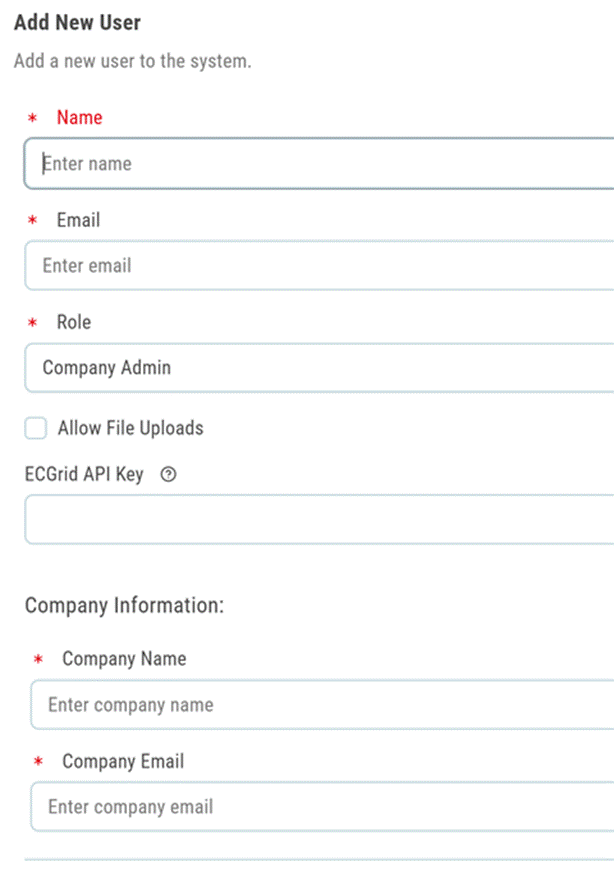
Adding a New Company User
Only Company Admins can add users to a company account.
- Navigate to Settings → Manage Users.
- Click Add User and enter the new user’s name and email address.
- Assign a role: Company Admin or Company User.
- The new user will receive an email with instructions to set their password and log in.
Resetting a User Password
Company Admins can reset the password for any Company User within their account. Navigate to the user management section, locate the user, and select Reset Password. The user will receive a password reset email.
Logging In as a Sub-account
Company Admins can log in as any Company User within their account — useful for troubleshooting or reviewing a user’s experience. Network Admins can log in as any Company Admin or Company User within their network. Hosts can log in as any account across the entire platform.
Important Logging in as another user should only be done for legitimate administrative or support purposes. All actions performed under another user’s account are attributed to that account. |
Choosing the Right Role
Assign roles using the principle of least privilege — give users only the access they need to perform their job.
- Assign Company Admin to users who need to configure integrations, manage attributes, approve subscribers, or administer other users.
- Assign Company User to users whose primary tasks are creating and updating products and catalogs day-to-day.
- Do not assign Network Admin or Host roles to publisher or subscriber accounts. Contact ECGrid TechOps if a network-level change is needed.
Note If your account does not show a user management section, your role may not include user management permissions. Contact your Company Admin or GPA support for assistance. |
Was this article helpful?
That’s Great!
Thank you for your feedback
Sorry! We couldn't be helpful
Thank you for your feedback
Feedback sent
We appreciate your effort and will try to fix the article