There are 2 ways to be notified of errors on ECGrid Simplify.
1. Email notifications
2. Webhooks
Email notifications
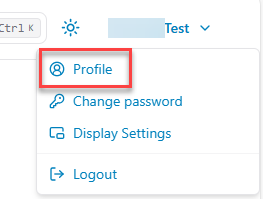
In the upper corner, click on the down arrow next to your user name and select profile.
Email notifications will be sent to the account email in addition to any other email addresses added on this page.
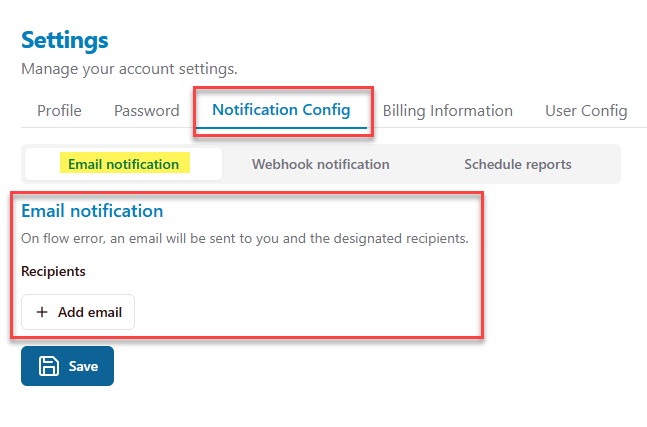
Webhooks
Config:
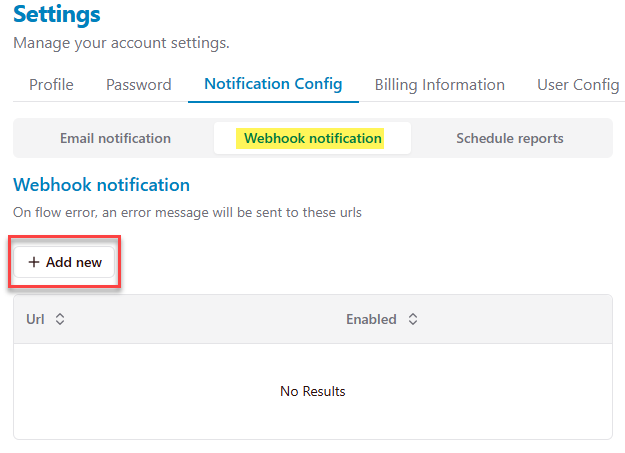
- Move to Profile page > Notification Config tab > Webhook notification tab
- Click "Add new" button
- Enter the webhook URL, then click Save
- New webhook URL is created
How it works:
On flow error, an error message will be sent to these URLs
Example request
curl --request POST \ --url 'https://test-webhook-url.com' \ --header 'content-type: application/x-www-form-urlencoded' \ --data 'ExternalId=2twmw3gth&Status=MapFailed...>'
Sample data

Was this article helpful?
That’s Great!
Thank you for your feedback
Sorry! We couldn't be helpful
Thank you for your feedback
Feedback sent
We appreciate your effort and will try to fix the article