Why am I getting these Network Alert Email Notifications?
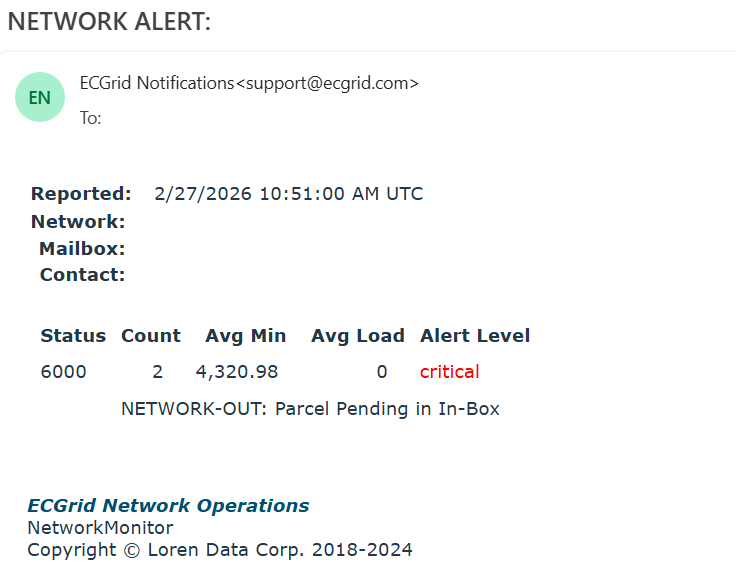
- Your mailbox has more than 3x the average number of files typically in your inbox
- You have files in your mailbox that have been there for less than a day AND more than 2x your average number in your inbox
- You have files in your mailbox that have been there for more than 24 hours
The alerts provide the following information:
- The date/time of the report
- Your network ID
- The mailbox ID (if applicable)
- The email contact
- Status
- 6000 (Files Pending in your inbox)
- 6001 (File has been downloaded, but not deleted from the inbox)
- 6110 (We received unsuccessful AS2 MDN receipts from your server)
- Count: Number of files pending
- Avg Min: The average number of minutes the file(s) have been pending
- Avg Load: Average byte count
- Alert Level
Action:
- If the status is 6000, check your connection into ECGrid to ensure it is working as expected.
- If the status is 6001, you are downloading files without DeleteOnDownload set. Go to My Connections on your mailbox and enable DeleteOnDownload.
- If the status is 6110, this indicates an issue with your AS2 connection - you should perform standard troubleshooting on your side before reaching out to support@ecgrid.com.
The following are the notification email order of preference:
Mailbox-level reports (only reporting a single mailbox at a time) order of preference for email address. Emails will only be sent to the first found User:
- Mailbox Error User
- Mailbox Owner User
- Network Error User
Network-level reports (rolls up all currently reported mailbox, which could be one or many), order of preference. Emails will only be sent to the first found User:
- Network Error User
- Network Owner User
- support@ecgrid.com
- If only one mailbox is being reported for a network, a copy will go to the mailbox and a copy to the network.
- If no error or owner is assigned to the mailbox, two copies will go to the network.
- If there are multiple mailboxes in the report, a copy will be sent to each individual mailbox and one to the network.
**If there is not a mailbox error or owner user, the network user may get an individual and rollup report.
Was this article helpful?
That’s Great!
Thank you for your feedback
Sorry! We couldn't be helpful
Thank you for your feedback
Feedback sent
We appreciate your effort and will try to fix the article