Connection
- Protocol: Basic.
- Parameters:
- Name - (Required)
Connection name.
Connection String - (Required)
Connection String to access the storage.
- Name - (Required)
Trigger
- Pull Document.
Action
- Create Document.
How to
Connect to Blob Storage
- Using connection string
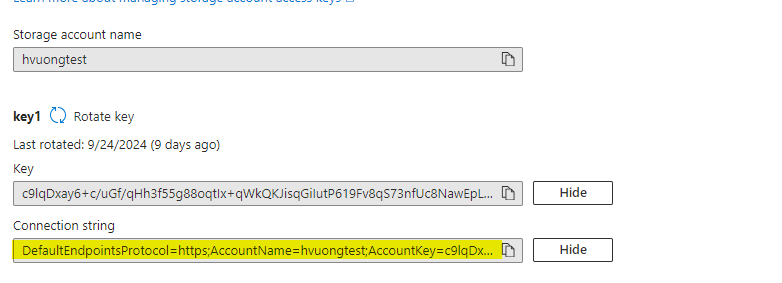
To connect to Azure Blob Storage, instantiate the BlobServiceClient class by passing your connection string to the constructor
string connectionString = "YourAzureStorageConnectionString";
BlobServiceClient blobServiceClient = new BlobServiceClient(connectionString);
In addition to using the connection string, Azure provides two other ways to connect to Blob Storage:
- Using Account Key:
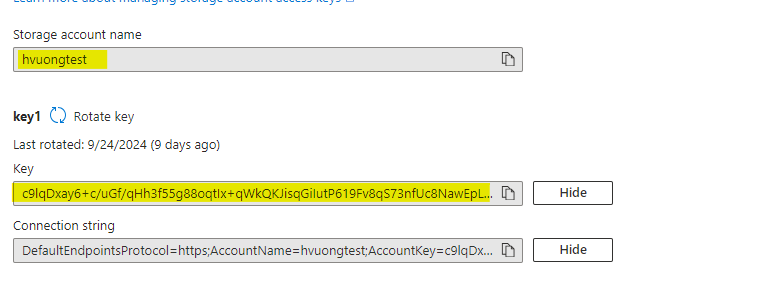
Account Key is one of the simplest ways to authenticate to your Azure Storage. You use the account name and account key to create a StorageSharedKeyCredential object and then connect to the Blob service.
string accountName = "YourStorageAccountName";
string accountKey = "YourStorageAccountKey";
StorageSharedKeyCredential sharedKeyCredential = new StorageSharedKeyCredential(accountName, accountKey);
BlobServiceClient blobServiceClient = new BlobServiceClient(new Uri($"https://{accountName}.blob.core.windows.net"),
sharedKeyCredential);
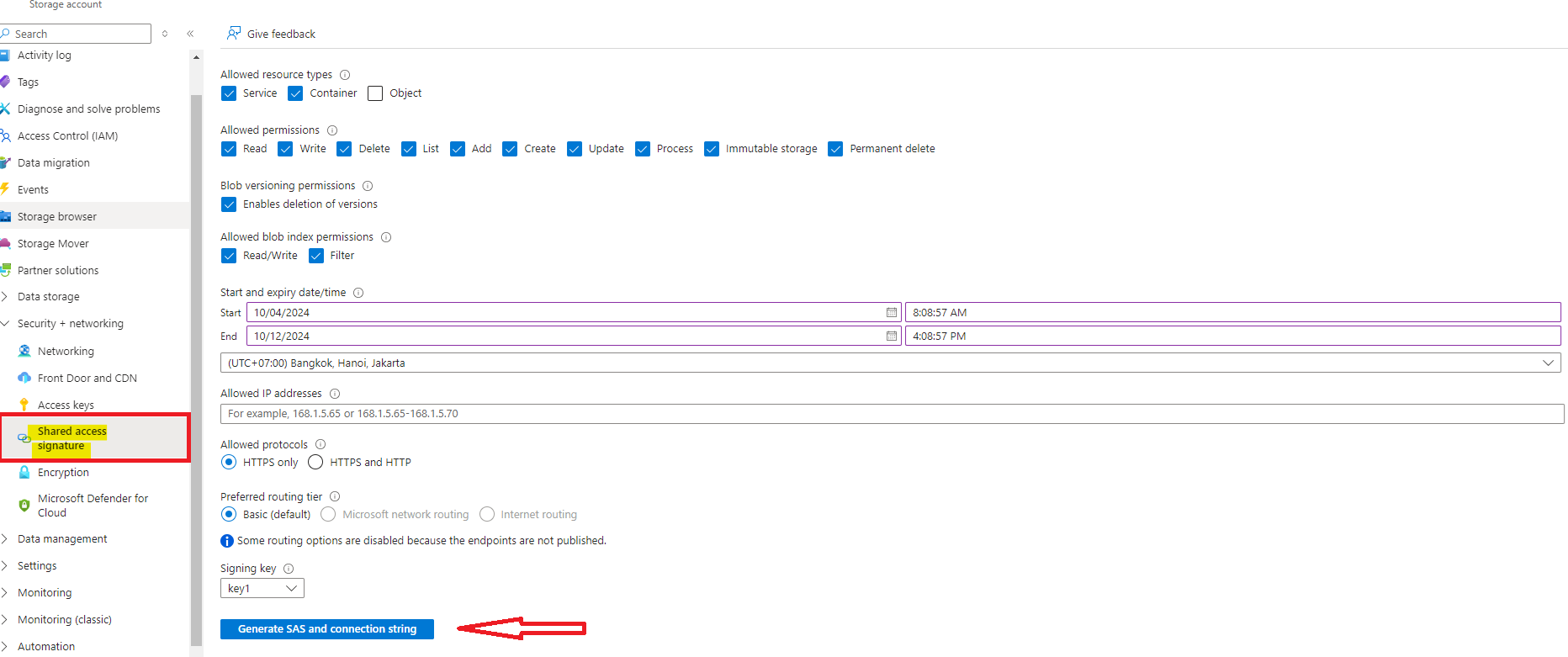
- Using SAS Token: SAS Token (Shared Access Signature) allows granular access control to Azure Storage resources without exposing your account keys. It generates a time-bound, permission-limited token to access blobs, containers, etc.
string sasToken = "YourSasToken"; // e.g. ?sv=2020-08-04&ss=bfqt&srt=sco&sp=rwdlacupx&se=2024-10-05T18:56:09Z&st=2024-10-04T10:56:09Z&spr=https&sig=YourGeneratedSAS";string blobServiceEndpoint = "https://YourStorageAccountName.blob.core.windows.net";
BlobServiceClient blobServiceClient = new BlobServiceClient(new Uri($"{blobServiceEndpoint}{sasToken}"));
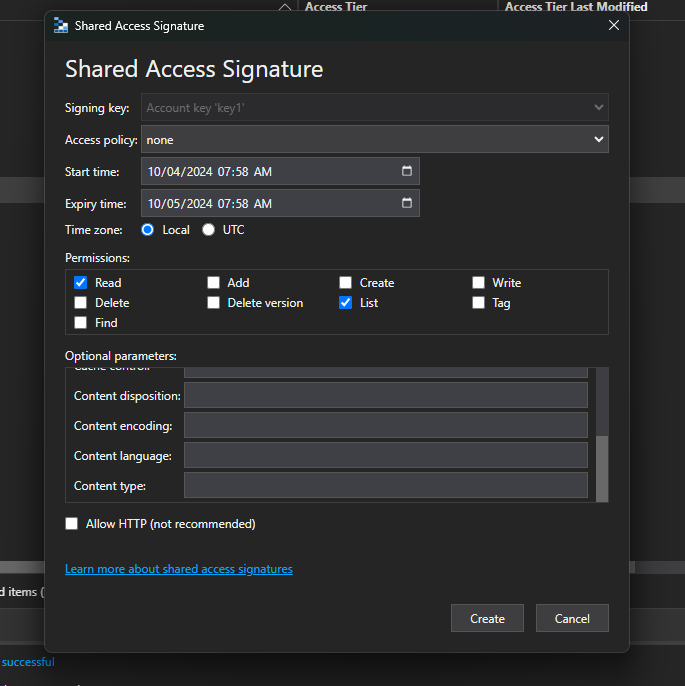
There are two ways to generate SAS token:
- From portal:
- From Microsoft Azure Storage Explorer:
Upload and Download
The Azure SDK provides multiple methods for uploading and downloading documents.
//Upload:
await blobClient.UploadAsync(stream, overwrite);
//Download:
await blobClient.DownloadContentAsync();
For more advanced usage, refer to the official Azure SDK for .NET documentation: https://learn.microsoft.com/en-us/dotnet/api/overview/azure/storage.blobs-readme?view=azure-dotnet
Was this article helpful?
That’s Great!
Thank you for your feedback
Sorry! We couldn't be helpful
Thank you for your feedback
Feedback sent
We appreciate your effort and will try to fix the article